
Renovate Bot
What is Renovate
Section titled “What is Renovate”Renovate is an open-source utility that gives you updates on whatever packages you have in your repository to be upgraded or not. Much like how the GitHub dependabot works, it works using the same methods as dependabot does.
What you can use with it
Section titled “What you can use with it”While the software that runs this bot is very simple to do, it includes almost all of the major programming languages that you use with your applications you host on TTGit. Some examples of programming languages include the following.
- NodeJS
- Ruby on Rails
- NPM
- GoLang
And many more, but just to name a few that we know of!
Setting it up
Section titled “Setting it up”Adding the required files
Section titled “Adding the required files”For setting up the bot with your repository, you need to add one file per the requirements that Renovate is looking for. This file should be named renovate.json and located in the root directory of your repository. Below is what the file should have it’s contents look like. You may copy the contents below if you want.
{ "extends": [ "config:recommended" ], "packageRules": [ { "matchUpdateTypes": [ "minor", "patch", "pin", "digest" ], "automerge": true } ]}Adding the bot
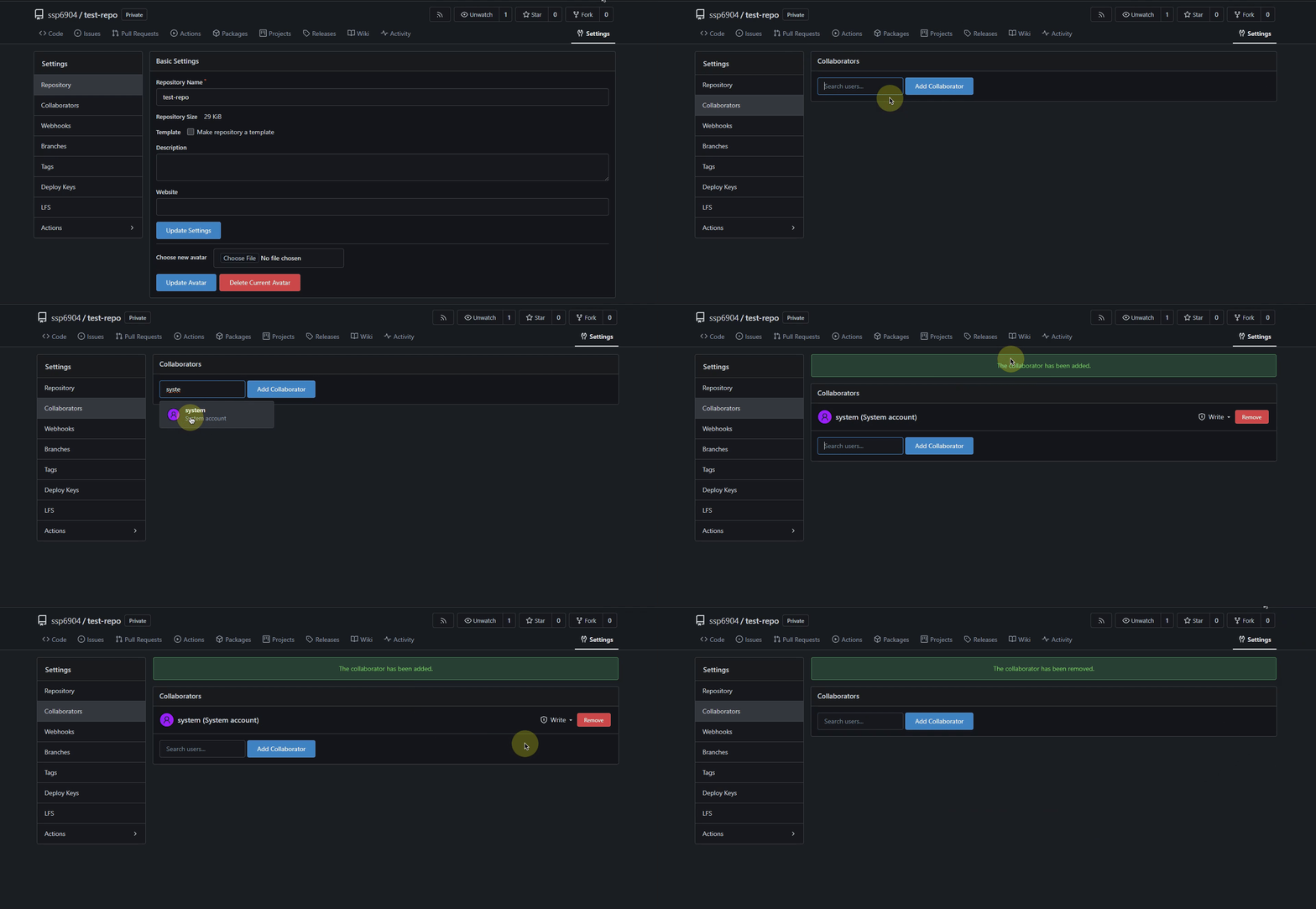
Section titled “Adding the bot”Once you have you have committed the file to your repository, you need to add the bot as a contributor so that the bot has the required permissions to access your repository. If you don’t do this, then the bot won’t be able to access any of your source code. For adding the bot, go to your repository settings. From there, click on the “Collaborators” link located on the sidebar to the left. Click on the input box labeled, “Search users”, and search for the name, “system”. Once the bot has appeared, click on it, and you are done setting up the bot for your repository. If you are a bit lost on doing the steps above, see the image below!
Now that you have set up the bot for your repository, let’s move on to how the bot will work with your programming language.
How you would get alerts
Section titled “How you would get alerts”Think about how the GitHub dependabot system functions. It works the exact same way as the Renovate bot does, such as making alerts based on what ever dependencies you have that are required to be upgraded or have a vulnerability in them. Types of alerts can be as follows.
- Security-based (if a package has a security vulnerability in it)
- General upgrade (if a package has a new update for it)
The Renovate bot gives you alerts by submitting to the issue system to your repository that you set up earlier. It also uses the pull request system that will ask you to push it’s changes it made to a package list file with the dependency that it’s targeting to. While you can ignore some of it’s alerts, it is best that you take action for them, even if they have a vulnerability in them. For example, node modules (if using nodeJS) are stored in the package.json and the package-lock.json. If a package has something wrong in it or requires an upgrade to it, then the bot will give you the message to take any actions that is needed by it.
What to expect
Section titled “What to expect”While the software that is controlling the bot is great and all, it might have some issues attached with it. Below are what you might experience while using the bot.
Not all repositories can be found
Section titled “Not all repositories can be found”The software uses the TTGit API as it’s base and to control the user it functions with. The software only checks if a repository has the require file as stated above, and the bot account you’ve added to your repository. At times, it might even crash or won’t respond in time.
Not all programming languages are supported
Section titled “Not all programming languages are supported”Most programming languages don’t always have a package manager system that is built-in with them.
Questions or comments about this feature
Section titled “Questions or comments about this feature”Since this is a new feature for us, we are very new to it and very curious on how we can use it with TTGit. If you have any suggestions on what we should improve with this new feature, give us an email or send us a message to our Discord server! Your feedback is greatly appreciated!